
AI & Automation ·
Part 4 — My very own DevShop
At the end of Part 3 I left you with a thought: once the AI is working in your folder and you're steering it, you start to wonder what could it do if I set it up to run on its own? This post is the answer. It's also the part where my day job and my hobby finally collided.
A bit of background. I've spent thirty years as an SAP consultant, working with enterprise software — the big, serious, can't-afford-to-get-it-wrong kind. So when I started doing the "working in the folder" stuff from Part 3, something bothered me. It worked, but it was haphazard. Every project was a slightly different mess. I'd get a brilliant result one day and a tangle the next. It felt like vibe coding — and vibe coding is fine for a toy, but it's no way to build anything you actually depend on.
So I asked myself a very SAP question: how do I make this repeatable?
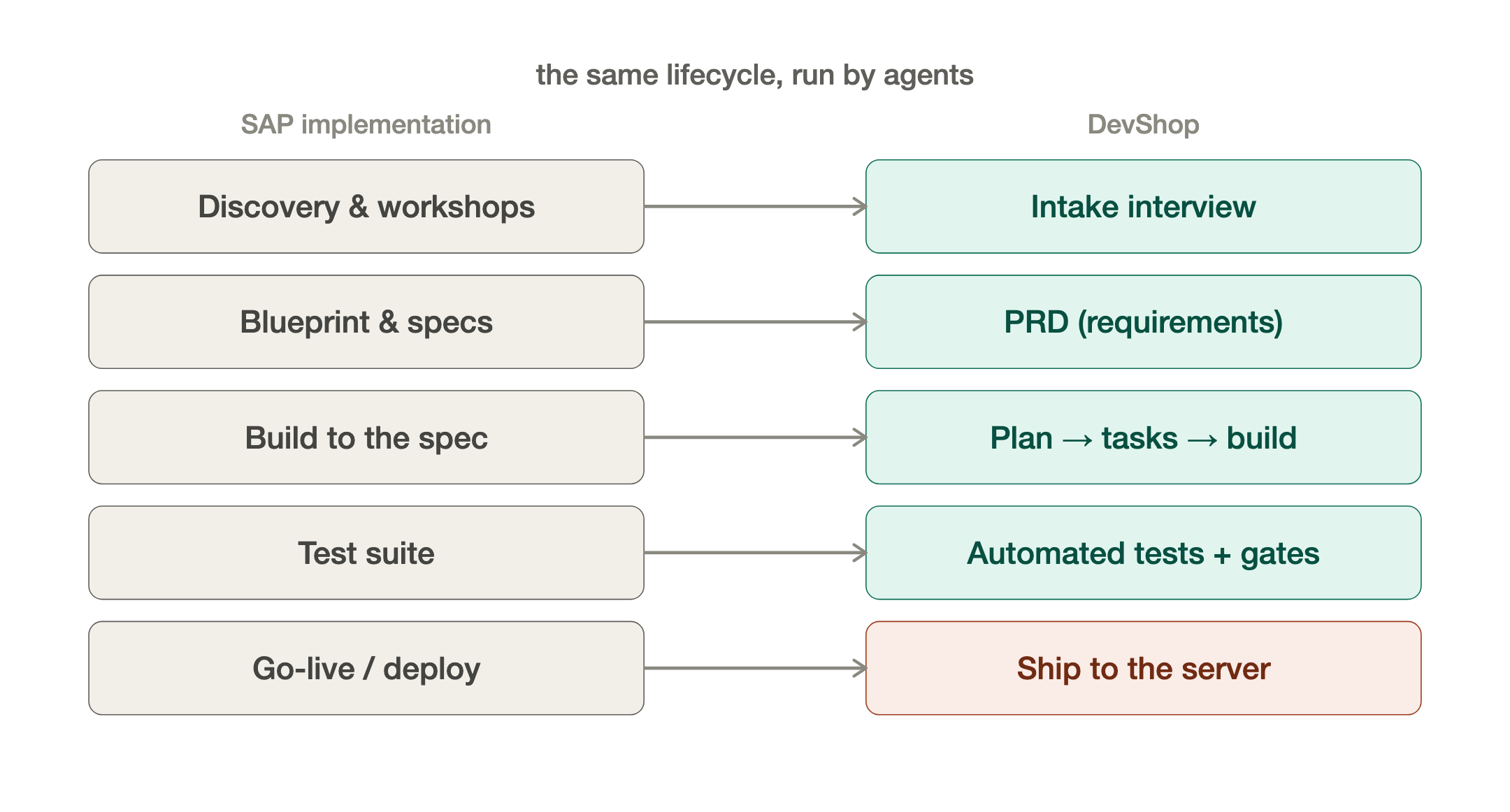
Here's the thing thirty years in enterprise teaches you. We don't just start typing. We run a discovery phase. We gather requirements in workshops. We write a blueprint and specifications. We build against those specs. We test against a test suite. And we only deploy when everything passes. That lifecycle exists because it's the difference between software that survives contact with the real world and software that doesn't. You can make it Agile and break the build into features and sprints, but the important thing is you have a plan and overarching design that you’re working to.
I realized there was no reason an AI couldn't be made to follow exactly that lifecycle. The tools from Part 3 — Claude Code, Codex — can be governed. You can hand them instruction files (the CLAUDE.md and AGENTS.md files that sit in a project), and you can build skills — reusable, encoded procedures — that force the AI down a defined path instead of letting it freestyle. So I took the implementation process I've run a hundred times in my career, and I encoded it into a skill. That's my DevShop.
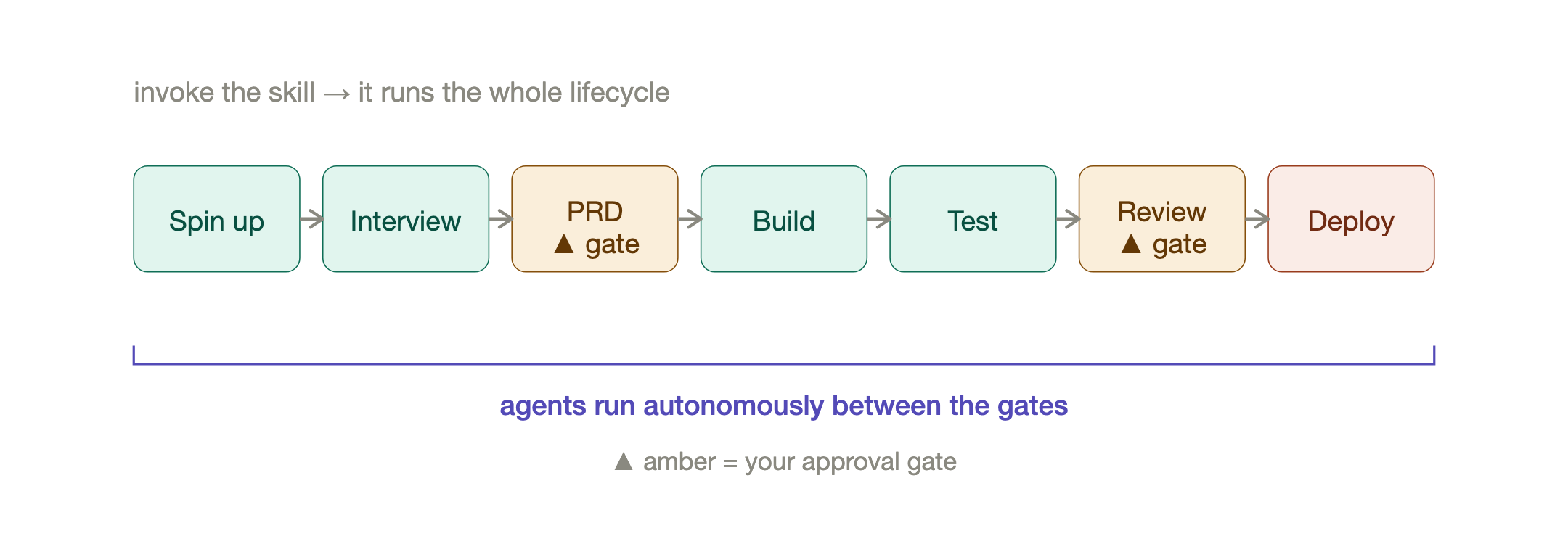
Here's what it actually feels like to use. I go into my projects folder and invoke the DevShop skill — "spin up a new project." It creates the folder specific to that project, lays down a baseline PRD (product requirements document) and a handful of supporting documents. Then a fresh agent takes over inside that folder and starts interviewing me — proper requirements gathering and discovery, the same questions I'd ask a client in a workshop. We go back and forth until it genuinely understands what we're building. Then it writes the full PRD, and we review it together. That's a gate. Nothing gets built until I approve it. Once we're through it builds out a comprehensive task list for all the features in all the phases, it slices the work into sprints and goes off and builds what we agreed — and from there I can let it run fairly autonomously, or keep review gates at every stage. My call, depending on how much I trust the work.
Notice what that is. It's discovery → blueprint → specification → build → test → deploy. It's a full IT implementation, run by agents, in a folder on my laptop. Or in my case my laptop, a server at home and a cloud server! That in itself would have sounded like a ridiculous statement 18 months ago.
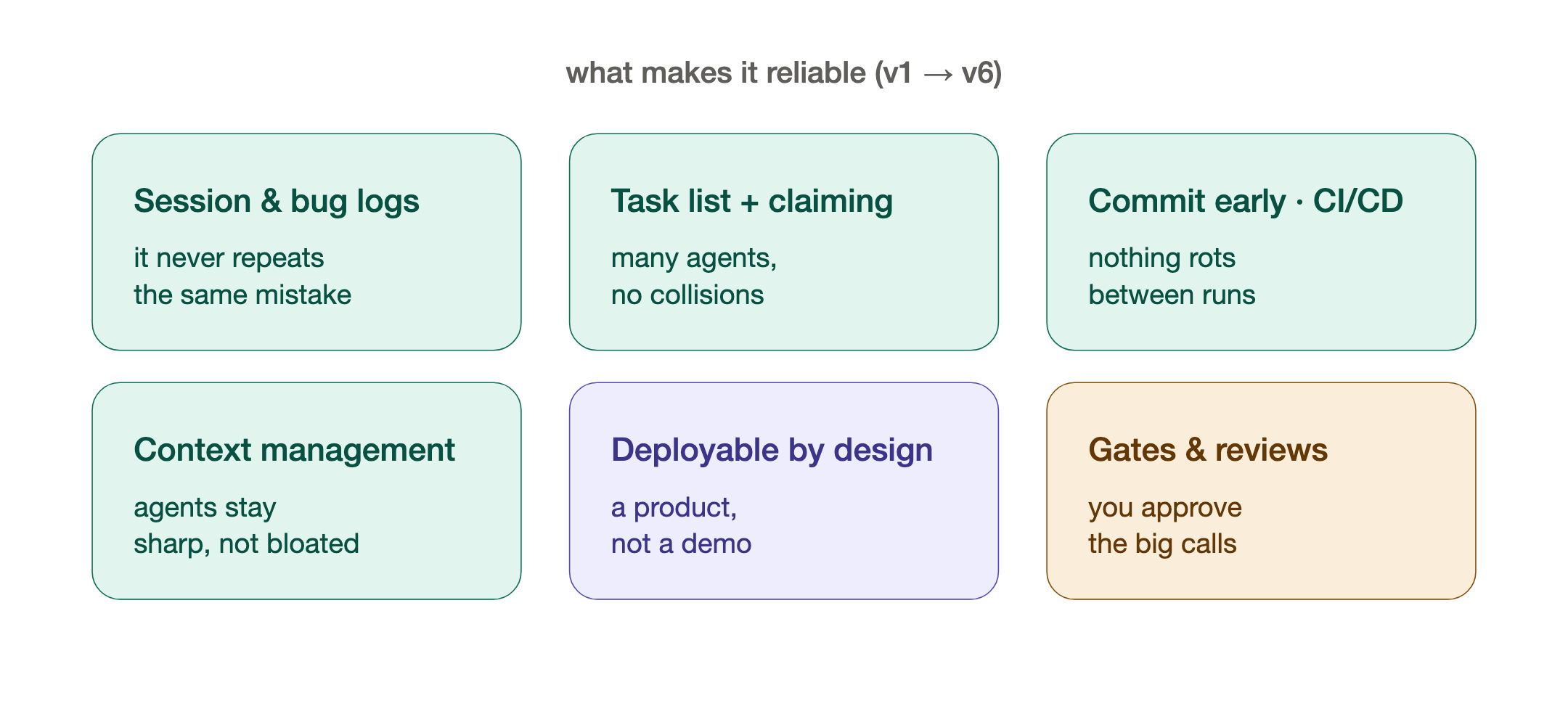
It did not work perfectly on day one. DevShop is on its sixth major version now, and most of those versions came from a hard truth: getting an AI to write code is easy; getting a system of AI agents to deliver reliable, maintainable, deployable software is the actual problem. A lot of v2-through-v6 is the unglamorous engineering discipline that any enterprise person will recognize instantly:
- Session logs and bug logs. Every working session is recorded; every bug is logged with its root cause so the system doesn't make the same mistake twice. Institutional memory, for a machine.
- A real task list with claiming. Work is broken into tasks in a shared list. An agent claims a task, works it, and updates its status — which means I can run several agents in parallel without them tripping over each other. That's just good project management, applied to robots.
- Check in early, check in often. The system commits code constantly and runs it through continuous integration — the same CI/CD hygiene any decent shop uses, so nothing silently rots between sessions.
- Managing context. AI models have a limited working memory, and they degrade as it fills up — "context rot." A lot of the refinement is about feeding each agent exactly what it needs and no more, so it stays sharp.
- Maintainable and deployable, not just working. This is the one most people miss. You can generate impressive code that's a nightmare to operate. Later versions of DevShop bake in proper DevOps thinking — how the thing gets deployed, monitored, and handed over — so what comes out the end isn't a demo, it's a product.
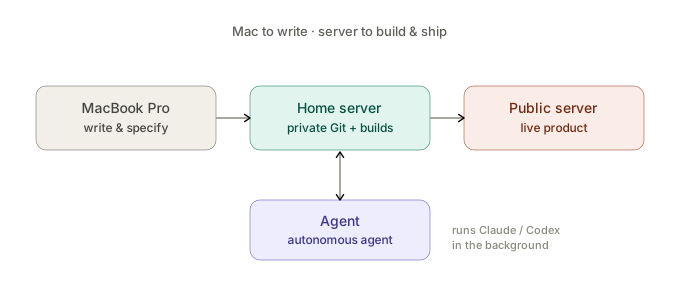
The infrastructure behind it is deliberately simple. I start projects on my MacBook Pro. Behind that I run a dedicated server at home that does the heavy lifting: it has its own private Git (think your own in-house GitHub), it runs Docker so I can build things in repeatable, identical containers, and it can deploy straight out to a public-facing server when the thing is a website or a live product. Mac to write, server to build and ship.
And there's one more piece that still feels a little like science fiction. On that server I've set up an open-source autonomous agent. I can give it high-level instructions and it will run through the procedures itself, using Claude or Codex in the background, with the DevShop plugin keeping it on the rails. It's the closest thing I have to an employee who works the night shift.
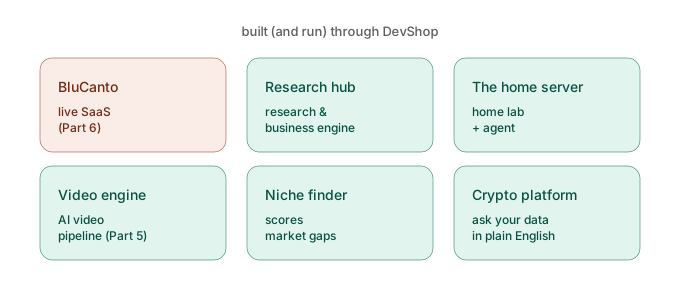
So what's come out of all this? More than I expected:
- BluCanto (blucanto.com) — a live, paying-customer SaaS product, built and shipped through DevShop. That's Part 6.
- A research and business-development engine, which decided what to build in the first place.
- The supporting infrastructure itself — the home lab, the private Git, the autonomous agent — much of it built using the very process it now runs.
- An AI video-production pipeline (Part 5 has a sample).
- A niche-finder that scores market opportunities and feeds BluCanto.
- A crypto/stock data platform that uses APIs to pull in price information on a daily basis and deterministically calculate key indicators daily before sending me a daily update.
- Plus a pile of smaller tools, a testing tool, task sync, project archiving, trackers.
Every one of those followed the same path: requirements, specification, gated build, test, deploy.
And that's the point I keep coming back to for people in our world. I am not vibe coding. I'm doing exactly what I've done for thirty years.
I'm specifying, I'm setting requirements, I'm running the workshop (sometimes with myself, sometimes with a real client), I'm reviewing the specifications and the test suite. And then I'm letting the agents get on with the details and the execution. The work that's left for the human is the senior work: deciding what "right" looks like and checking that it was done. That's not a threat to an experienced consultant. That's the most natural fit imaginable. The discipline you already have is the thing that makes this safe and repeatable. The agents just gave you a delivery team that never sleeps.
In Part 5 I'll get into something this whole setup forced me to think hard about: when should the AI run on someone else's cloud, and when should it run entirely on your own hardware? I'll use two of my own builds — an offline companion device I built for a family member, and a video engine — to show the local, hybrid, and hosted trade-offs, with a video the factory made itself.
If you take one thing from this post: the leap isn't learning to code. It's realizing that the way you already run a serious project — discover, specify, build, test, deploy — is exactly the structure that turns AI from a clever toy into a dependable factory.
— Jerome
Originally published on LinkedIn, July 1, 2026.