
AI & Automation ·
Part 2 — Simple wins: the AI a consultant can use on Monday morning
In Part 1 I laid out the whole ladder — from typing prompts into a chatbot all the way to running an autonomous software shop. This post is the bottom rung, and I want to be honest about something: this is where everyone starts, and for a lot of people in our field maybe that’s as far as you go. If your opinion is “it’s just another google” then you’re missing the whole point, and you won’t progress. Everyone needs to get through this stage to start finding AI truly useful. It fundamentally is not another google. But it’s up to you to understand how to release the full potential.
You don't need to build anything. You don't need to code. You need a browser, a paid subscription to a frontier model, and a change in how you think.
For small mindless tasks you need to start asking yourself. Do I need to do this, or is it something AI can do for me?
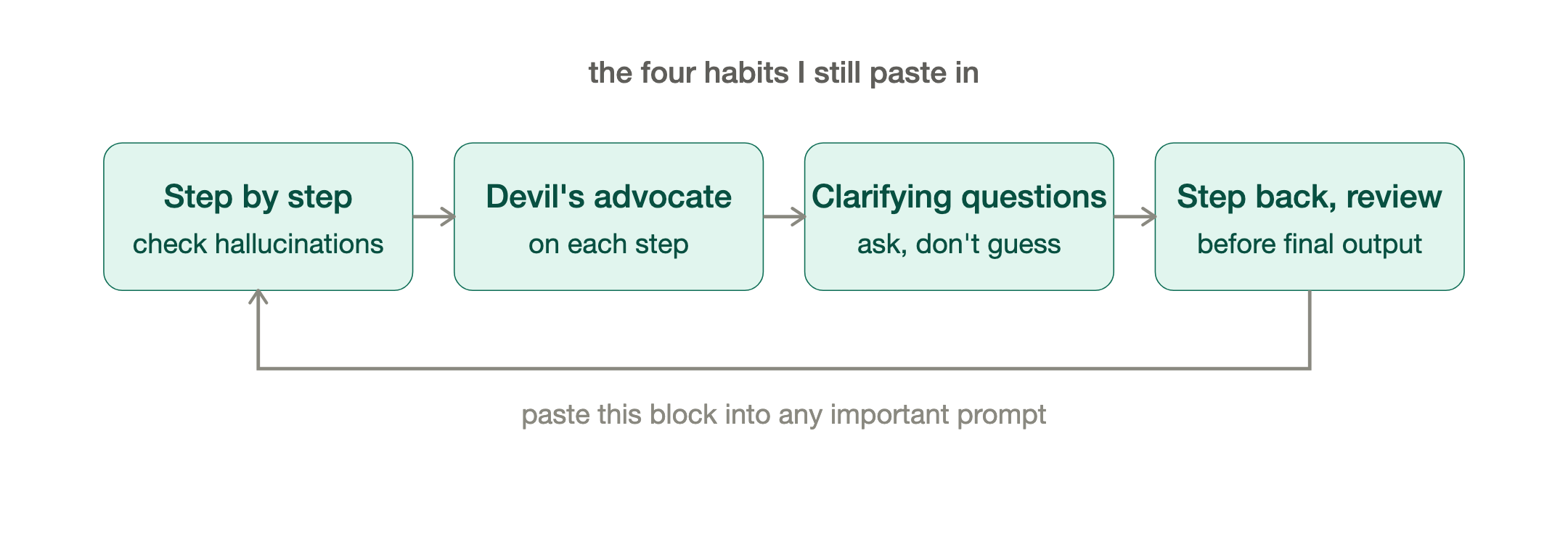
A word on prompt engineering. A year ago "prompt engineering" was a real skill — you had to coax and trick early models into behaving. It's worth building that muscle but be aware it's becoming less necessary with every release. The models are getting much better at working out what you meant, so the elaborate incantations matter less and less each day. And this is constantly evolving, sometimes by the hour. If I was writing this article 6 weeks ago it would be a completely different article. Some of the things I was doing two weeks ago are no longer necessary because the models have progressed. That said, a handful of habits still earn their keep, and I still paste some version of these into important prompts:
“Think step by step, and review each step for accuracy and hallucinations.
Play devil's advocate on each step before moving on.
Ask me clarifying questions as needed.
Take a step back and review your answer before presenting your output.”
That little block does more for output quality than any amount of clever phrasing. It forces the model to slow down, check itself, and — my favorite part — ask you the questions a good junior would ask instead of guessing.
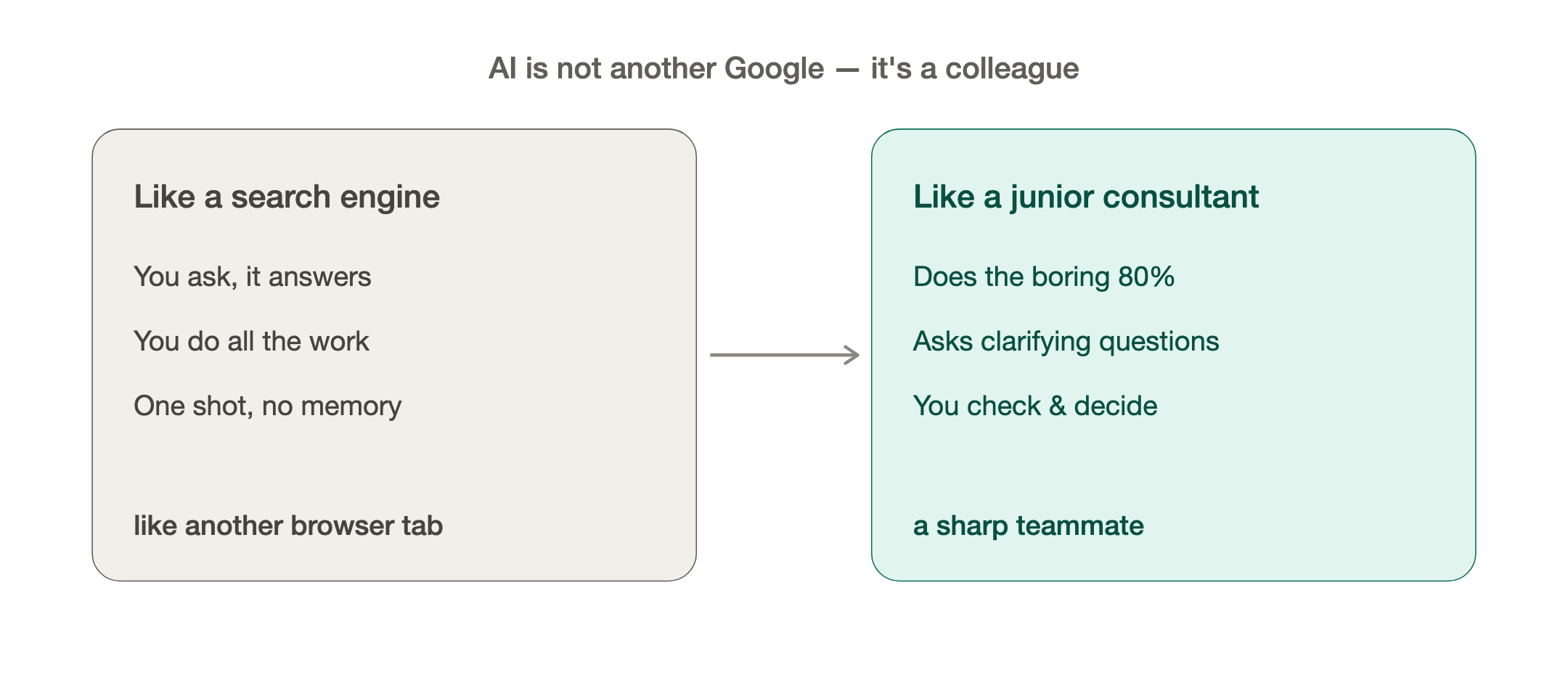
Which is the real mindset shift: stop treating AI like a search engine, and start treating it like a sharp, slightly over-eager junior consultant. One who's read everything, never gets tired, will happily do the boring 80%, and needs you — the experienced one — to check the work and make the judgment calls. Once you see it that way, the use cases fall out on their own.
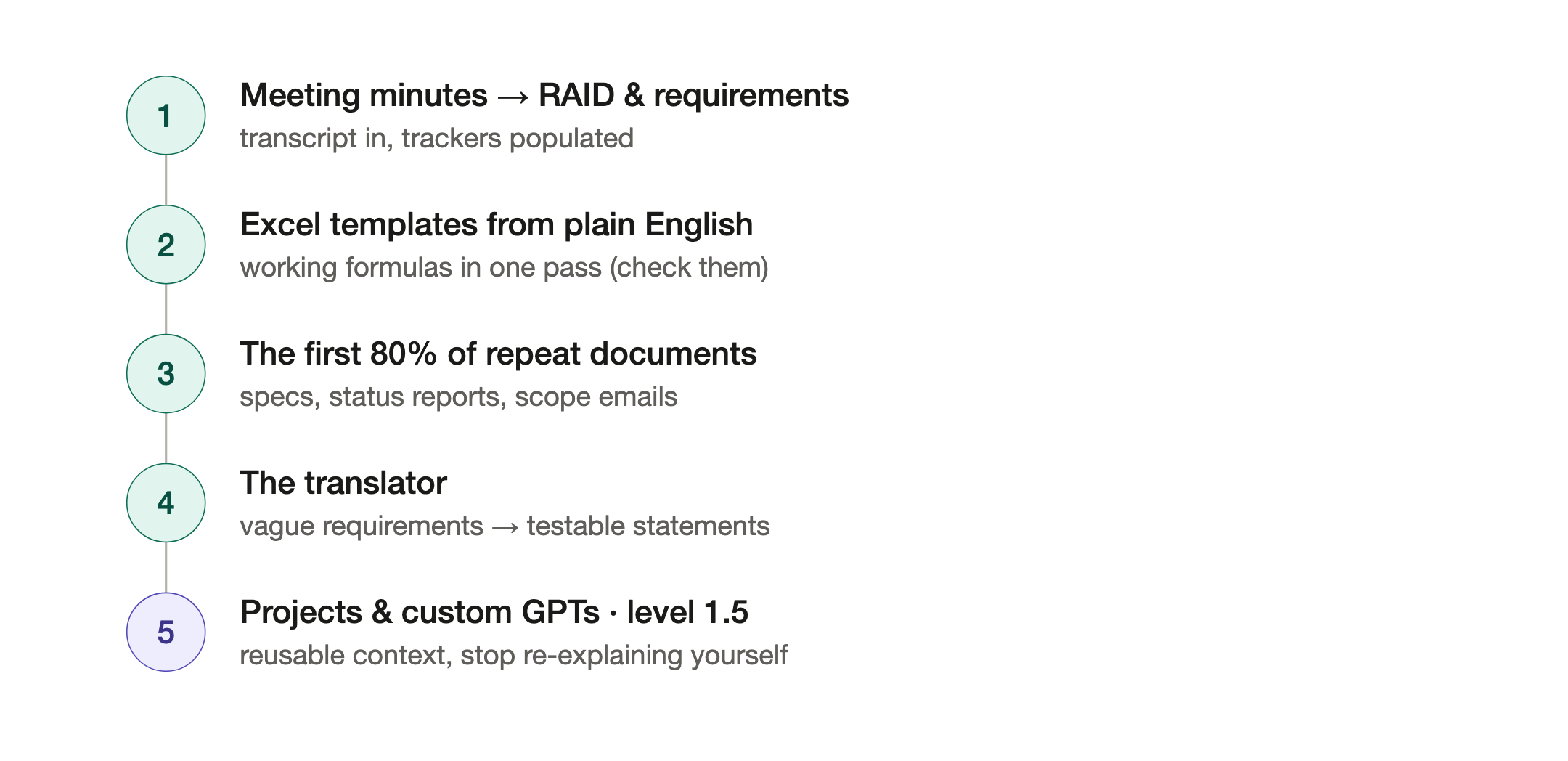
Here are the five I reach for almost every day.
1. Meeting minutes that write themselves — and feed your trackers. Record the workshop (Teams and Zoom both transcribe now), drop the transcript in, and ask for minutes, decisions, and actions with owners and due dates. Note taking is a thing of the past. The job that used to eat 45 minutes after every session is now two minutes and a read-through. But go one step further: ask it to scan the transcript for requirements, decisions, risks, issues and dependencies, and output them as a table you can paste straight into your RAID log or requirements tracker. Suddenly the workshop doesn't just produce minutes — it populates your project artefacts. Tell it the columns your RAID tracker uses and it'll format to match. From workshops where I used to have two dedicated junior consultants taking notes. It’s now one high quality microphone and a recording / transcription. Don’t get me wrong you still have to go and listen to the recording yourself sometimes. But in general note taking is a solved problem for humans.
2. Excel templates from a plain-English description. "Build me a cutover tracking sheet — task, owner, planned start, planned end, actual, status, predecessor, and a Status column that goes red when actual is past planned." You'll get a working template, formulas included, in one pass. Same for a RACI, a test-script log, a defect tracker, a simple plan. I've built things in ninety seconds that I'd previously have either suffered through manually or stuck on someone's backlog for two weeks. Just make sure to not use proprietary or sensitive data and populate that afterwards. Also at this stage ... check the formulas! AI is nondeterministic. That means you might not get the same answer the same twice. That's not good for a spreadsheet. Until you start using harnesses or agents. In the web browser (chat) check every cell.
3. The first 80% of any document you've written fifty times. Functional specs, blueprint sections, status reports, scope-change emails, feed it some actual examples of yours and let it build the outline, and then flesh it out.. make it a discussion before it produces anything. Treat it only as a draft. Give it the bones and your intent; it gives you a solid draft. Your value was never in the typing — it's in knowing what should be in the document.
4. The translator. This is the consultant's secret weapon and almost nobody uses it. Paste in a wall of vague business requirements and ask it to turn them into clear, testable statements — and to list the questions it would need answered before it could build them. It's astonishingly good at surfacing the ambiguity you'd otherwise only discover three weeks into a build. It won't replace your client conversations; it'll make you walk into them already knowing where the landmines are.
5. Custom GPTs and Projects. Now we’re moving up a level. Level 1.5. Stop re-explaining yourself. Everything above works in a single chat. The next step up costs nothing: a Project (Claude) or a custom GPT (ChatGPT) is just a chat with persistent memory, and your own templates loaded in. Set one up once with your methodology, your standard document formats, the module you specialize in and every conversation after that starts with all of it already in context. I use this to guide meeting minutes output formats, provide scope documents or specs to interrogate or general guidelines. Or if I’m building something like a complex spreadsheet and don’t have the luxury of installing a harness.. then I use it to store the work I’ve already done so I can pick it up another day and start from where I left off.
It's the difference between briefing a new contractor every morning and working with someone who already knows how you like things done.
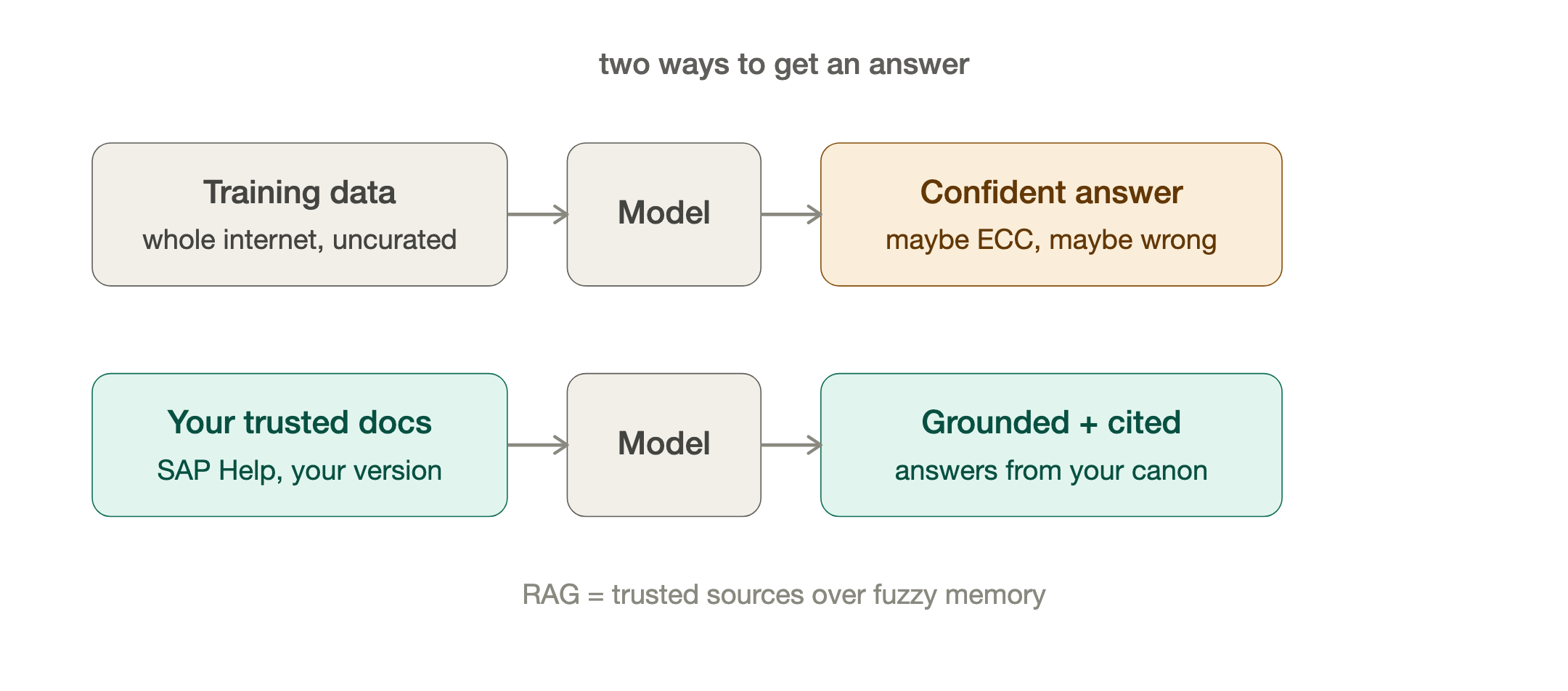
Similar to projects but deserves its own section is Google’s NotebookLM.
I would reserve this only for nonproprietary data as it’s a free service so you don’t control the terms of service in the way you might for a paid service.
NotebookLM is a RAG AI system, or retrieval-augmented generation. In plain terms, instead of relying on what the model learnt in training (the whole internet uncurated), you give it a set of trusted documents and make it answer only from those, with citations. Trusted source over fuzzy memory. That single idea cuts down hallucinations and inaccuracies.
Have you ever asked ChatGPT or Claude about a table or program name. You might tell it you’re running S/4 HANA 2023 but it may answer with something from ECC 6.0 .. it wants to answer whether it's right or wrong. It’s like a bad consultant that hasn’t learnt to say “I don’t know, I’ll get back to you” yet. With NotebookLM you limit its knowledge to specific sources. Upload the SAP help specifically for your version and it can only answer from the canon you’ve uploaded.
I personally have downloaded large sections of the SAP Help Portal for each version and module I’m interested in. Load them in, and then interrogate that. Ask "how does tax determination work in this scenario, and where is that documented?" and it answers from the actual SAP help you gave it, quoting the passage and pointing you to the source — not from whatever half-remembered, possibly-outdated, possibly-hallucinated version lives in the model's training data. For anyone who lives in dense product documentation, this turns 400 pages into something you can have a conversation with. It'll even generate a decent audio summary.
Now the part I won't skip, because we work in enterprise and it matters more than any of the tricks above.
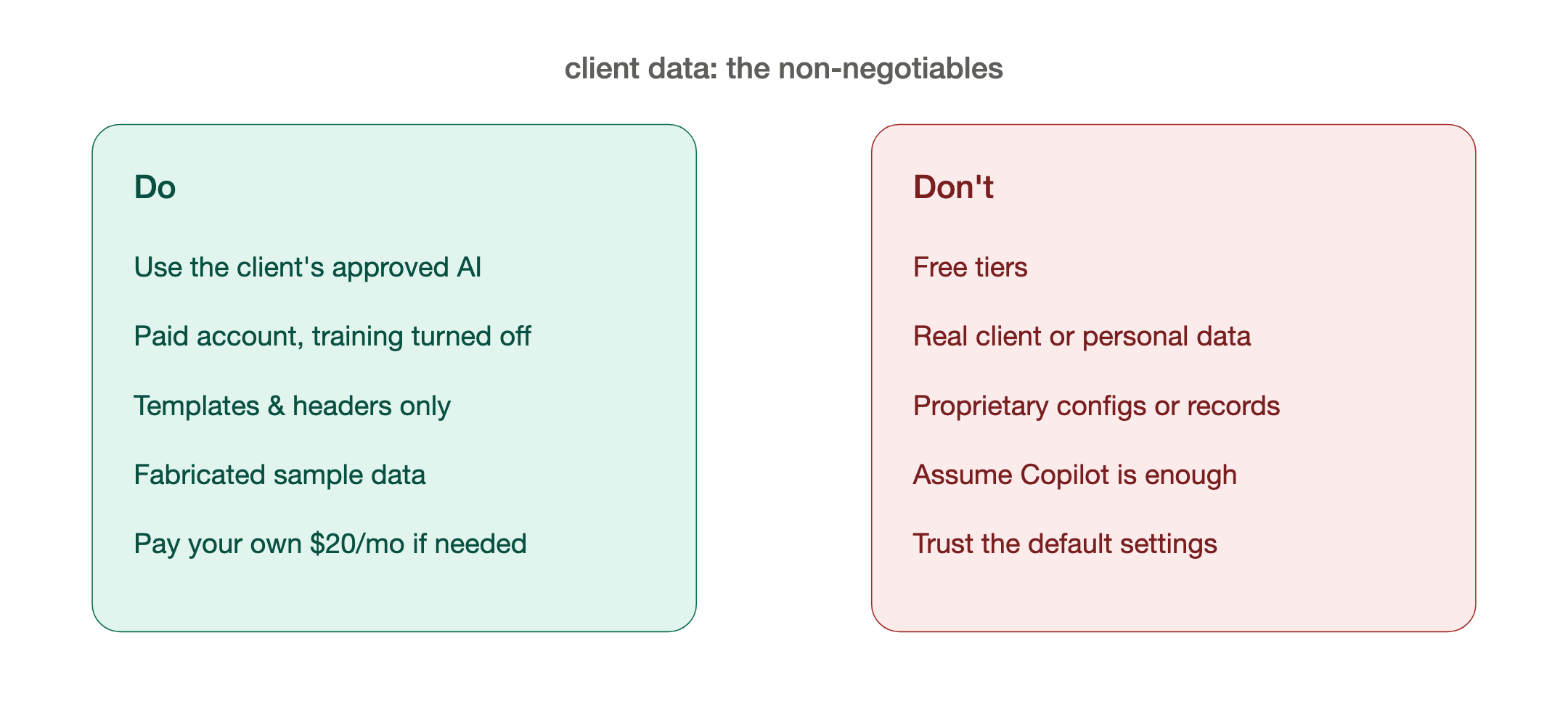
Working for a client — the rules.
- Use the AI your client has approved. If they provide a tool, use theirs, full stop — inside it the normal data rules relax because it's their sanctioned environment.
- If you're using your own, always use a paid account — never the free tier — and go into the settings and turn off "use my data for training." Free tiers are the ones most likely to learn from what you type.
- Never put proprietary or personal client data into your chats. Work with templates, headers, and structure only — no real data — or fabricate sample data that has the same shape. You can design the whole spreadsheet, spec, or analysis without a single real record in it.
- Be realistic about tools. In my experience the bundled enterprise assistants (Copilot and friends) generally won't hack it for this kind of work yet. Use Claude or ChatGPT. If your client or company won't provide them, pay for your own — the $20-a-month personal plan pays for itself in the first afternoon.
And one more honest point. This stage is the starting point, and everyone has to pass through it — but for some of you it might also be where you stay, and that's completely fine. If your client locks down their laptops and won't allow you to install anything, you may never get to the "working in the folder" stuff in Part 3. You can still get enormous value right here, in the browser, with Projects and custom GPTs sharpening every output you produce. Don't let anyone tell you that's not "real" AI use. It is. It's most of the value, for most people.
In Part 3, for those who can install software, we step over the line almost nobody outside of software has crossed: letting the AI out of the chat window and into your actual files — working in the folder. That's where it stops being an assistant and starts being a colleague (or agent).
If you take one thing from this post: pick one of the five above and use it this week on something real. The gap closes fast once you start climbing.
— Jerome
Originally published on LinkedIn, June 30, 2026.